MooseFS Documentation
This documentation describes MooseFS 5.0 and newer.
MooseFS is a fault-tolerant, scalable distributed file system designed for high-performance storage needs. Organizations use MooseFS to manage large volumes of data across multiple machines. MooseFS keeps that data redundant, reliable, and available.
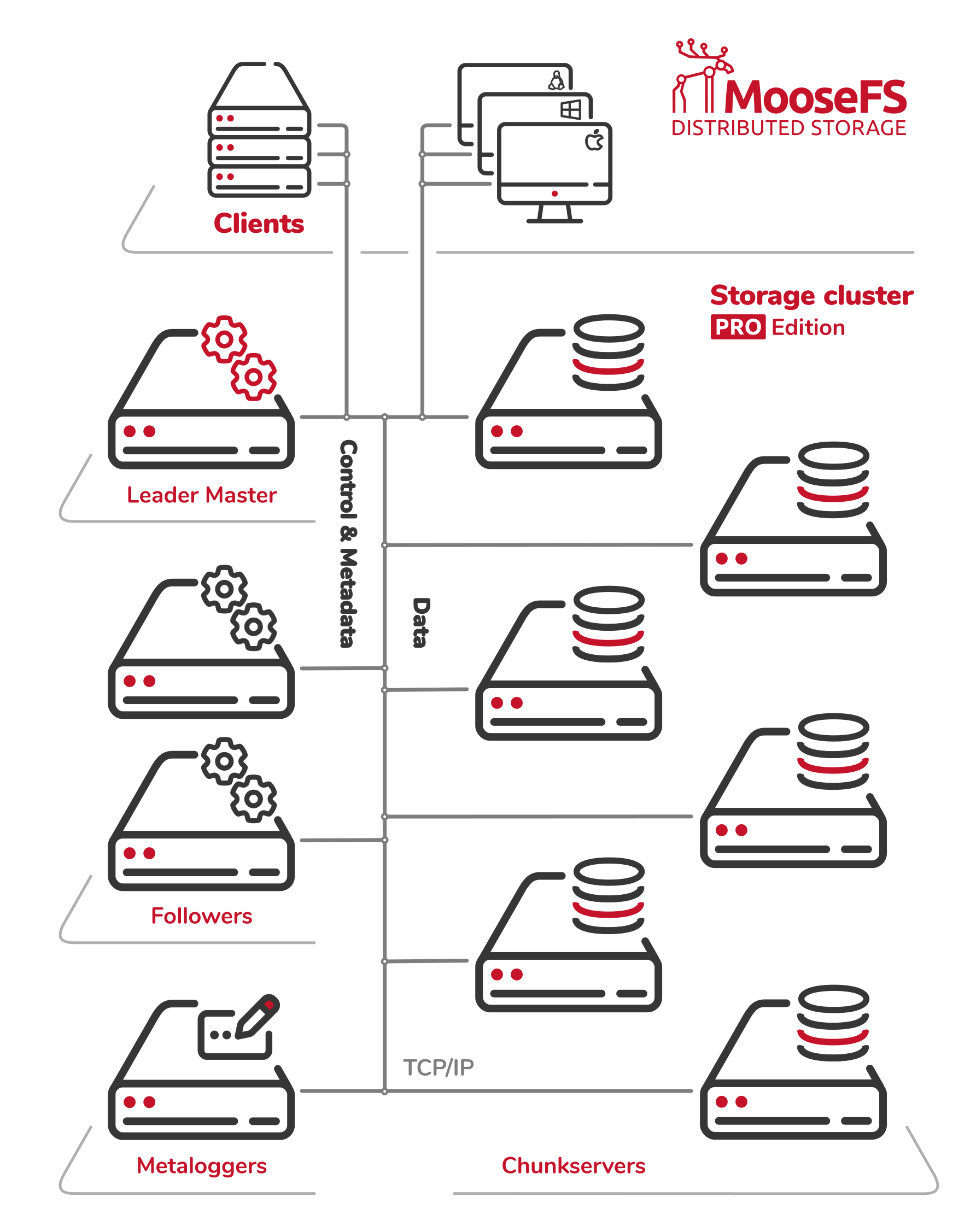
A MooseFS PRO instance. One Leader Master Server with Followers, and two kinds of traffic on one network: control and metadata, and file data. Control and metadata run between the clients and the Master Servers, file data between the clients and the Chunkservers. The Metaloggers only receive, so nothing is ever served from them.
How this documentation is organized
The documentation is divided into four parts, in the order in which you meet the product. The sidebar names them. Each part contains the chapters listed below. Quick start is listed above the parts, next to this page. It takes you from nothing to a mounted file system, with the choices already made. Quick start belongs to no part, because it starts the work and does not cover a single phase.
Part I: Explore answers whether MooseFS is the system you need. Start Here says what MooseFS is and where it fits. Concepts defines every term that the rest of the documentation uses, one term per page. Editions & Licensing says what you may run and what you buy. Solutions describes deployments built for a given workload. Read this part when you are choosing a storage system.
Part II: Design answers what to build. Architecture names the components and the paths that data and metadata take between them. How It Works describes a single mechanism in depth: its states, edge cases, and cost. Planning & Sizing calculates the hardware for a workload. Read this part when you are designing a cluster, and when you are working out why a cluster behaves the way it does.
Part III: Run answers how to carry out a task. Deployment takes you from packages to a mounted cluster. Operations sorts its pages by the task you have, not by the component that task touches. Monitoring covers what the cluster reports about itself and how to read those reports. Upgrade & Migration covers moving to a newer version or another edition. Troubleshooting is organized by the symptom you can see. Integrations describes how to connect MooseFS to other systems and protocols. Read this part when you are running a cluster. The pages on everyday work on a mounted file system are written for the people who use the file system, not only for the administrators who run it.
Part IV: Look Up answers what something is called and what value it has. Reference lists the options of every configuration file, the command line tools, the network ports, and the values that the build fixes. Glossary defines the vocabulary in one line for each term and points to the page that explains the term. How-to lists every procedure by the task it carries out, and points to the page that covers the procedure. FAQ answers recurring questions in full. Release Notes records what changed between versions.
Every statement belongs to one page. Where another page needs a term, that page links to Concepts instead of defining the term again. Where a page needs a procedure, it links to the chapter that covers the procedure.
This documentation covers both MooseFS PRO and MooseFS Community Edition (CE). Unless a page says otherwise, every feature described here is available in both editions. Functionalities exclusive to MooseFS PRO are clearly indicated with the "PRO" icon.
Man pages
The packages install a manual page for every command line tool and every configuration file, so man mfsmaster works on any machine that runs MooseFS. The same set is in Man pages, in the form in which the product ships it. Read it there when you are away from a cluster.
Disclaimer
The MooseFS documentation is a work in progress. We are continuously updating and expanding it. It is subject to change at any time without prior notice.
We make every effort to ensure the accuracy, clarity, and reliability of the information provided. Even so, all content in this documentation is offered "as is," without any warranties of any kind, whether express or implied. Saglabs SA, the MooseFS team, and its contributors assume no responsibility for any errors, omissions, or outcomes that result from the use of this documentation. If you notice any inaccuracies or have suggestions for improvement, please report them to support@moosefs.com.
Some parts of this documentation may have been drafted or edited with help from AI-based tools. Our team reviews all such content before publication.
Credits
Created by Saglabs SA, the company behind MooseFS.
Contributors: Małgorzata Antosik, Piotr Konopelko, Agata Kruszona-Zawadzka, Krzysztof Krygiel, Aleksander Wieliczko, Jakub Ratajczak.
License
This documentation is licensed under the Creative Commons Attribution–NonCommercial–ShareAlike (CC BY-NC-SA) License.