MooseFS storage in Proxmox
This procedure adds a MooseFS instance to a Proxmox cluster as one storage entry that every node uses. Virtual machine disks, templates, and ISO files are then stored in MooseFS. Run it after the nodes are up. The MooseFS cluster itself can be deployed on the same machines or on separate machines.
The Proxmox nodes take the Debian packages
MooseFS Debian packages are compatible with Proxmox, so a Proxmox node is prepared like any other Debian machine. Add the MooseFS package repository with the codename of the Debian release that the node is based on. Then install what the node needs to run. Install the server components covers the Master Server and the Chunkservers. Install clients covers the client package that every node needs to mount the file system.
Two things belong to the nodes rather than to MooseFS. The name of the Master Server must resolve on every node, through DNS or through /etc/hosts. Each Chunkserver and each mount finds the cluster by that name (make the Master Server name resolve on every machine). Also, keep a disk that is meant to hold chunks out of the hypervisor's own storage. Do not add such a disk to Proxmox as an LVM, ZFS, or directory storage. Instead, format and mount the disk for the Chunkserver, with one file system per disk. The steps are in give each Chunkserver disk its own file system and mount point.
Every node mounts at the same path
A storage entry in Proxmox has one directory path and applies this path to the nodes that you select. The mount point must therefore be the same on each selected node. Mount MooseFS at that path and make the mount permanent, so that a rebooted node mounts its storage again. An /etc/fstab entry and a systemd mount unit both do this. The forms are in make the mount permanent. Mount before you add the storage entry, on every node that the entry will cover.
A node the entry covers but the mount does not is not reported as a fault. Proxmox creates the path as an ordinary local directory, populates it with the storage layout, and lists the storage as active with the free space of that node's own disk. The nodes then hold different data under one entry marked as shared, and the disks written on the node without the mount stay on its local disk. Nothing in the interface says so. Check a suspect node with df against the mount point, not with the storage status.
The export rule that matches these nodes must grant read-write access. That rule also decides what root on the node becomes inside MooseFS. An entry that names neither maproot nor mapall maps root to uid 999, so a node whose hypervisor processes run as root needs maproot=0 on that entry. The entry forms are in access control.
Add the mount as a Directory storage
In the Proxmox GUI, open the Datacenter view, select Storage, and add a storage of type Directory.
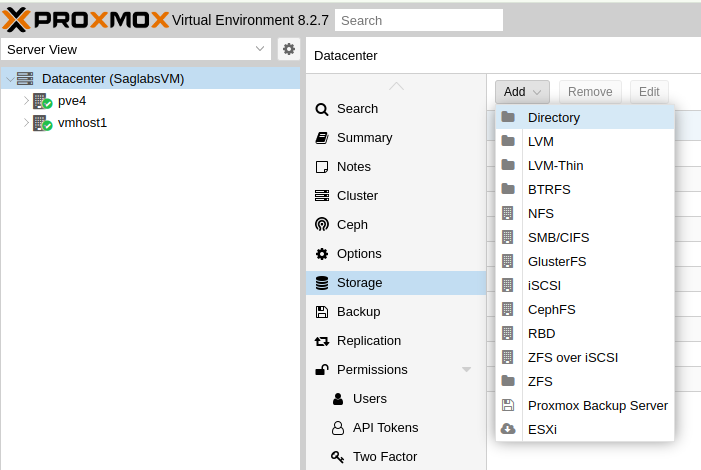
Datacenter, Storage, Add, Directory
In the dialog, the directory is the mount point. The rest of the entry describes how the cluster may use the storage:
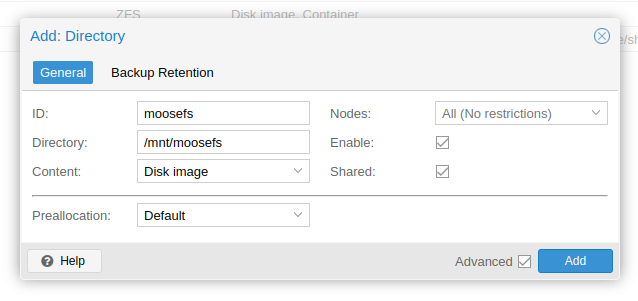
The Add: Directory dialog filled in for a MooseFS mount
- ID names the storage inside Proxmox.
- Directory is the mount point,
/mnt/moosefshere. - Content selects what Proxmox may keep there, and accepts as many kinds as you tick. A Directory storage offers eight kinds. A shared mount is usually made for four of them: disk images, container volumes, ISO files, and backups. The rest are container templates, snippets, an import area, and
none. - Nodes limits the entry to some of the nodes. Every node that the entry covers must have the mount at that path.
- Shared tells Proxmox that all those nodes access the same data. MooseFS provides that shared access.
Confirm that an image is stored in the cluster
Create a virtual machine disk on the new storage. Find the file that Proxmox wrote under /mnt/moosefs. Then ask the Master Server where the parts of that file are, with mfsfileinfo:
mfsfileinfo /mnt/moosefs/path/to/the/disk/image
The output lists every chunk of the file with the Chunkservers that hold the copies of that chunk. Where the Storage Class of that directory uses Erasure Coding, the output lists the Chunkservers that hold the Erasure Coding parts. Follow up on a chunk with fewer copies or parts than that class requires. Also follow up on a chunk with a copy reported as INVALID or WRONG VERSION. The meaning of each of those reports is in chunk versions and states. A copy reported as MARKED FOR REMOVAL is on a disk that is being withdrawn, and is not a fault. Start from the symptom in Troubleshooting.