MooseFS PRO only.
Location
A location is a named group of a cluster's modules that you manage and place data in as one.
What it is
The capability to divide a cluster this way is called Multilocations PRO (PRO Edition only). A location is the unit of that division. A cluster is divided into at most eight locations. Every module belongs to exactly one of them: every Master Server, Chunkserver, Metalogger, and client. The IP address of a module decides its location. You map ranges of addresses to locations. A module whose address falls in no range belongs to the default location. Locations are meant to follow the way a cluster is spread out (one per site, per building, per room), but nothing enforces that. A location groups only what you chose to map into it. A location needs at least one Chunkserver of its own to hold data.
Every cluster has a location. A new instance runs with a single location named default and behaves as a cluster without locations. The division becomes visible once you create the second location. One location is always the default location. The default location includes every module that you have not mapped. You cannot switch the default location off. To retire it, you first make another location the default. The cluster refuses that move until the conditions on taking a site out of service are met.
A location is in one of three states:
ON: the location works in full.IO: clients read and write in the location, but MooseFS does not replicate, rebalance, or delete chunks there.OFF: the location is out of the cluster. Its Chunkservers are not accepted even when they connect.
A new location is created in the OFF state, so its addresses and Storage Class definitions can be put in place before anything moves there. A location leaves the cluster the same way. It is deleted only while it is OFF, and only once nothing points at it any more. This includes mapped address ranges and Storage Class definitions. You set the state and promote another location to default with mfslocadmin. Every one of these changes takes effect as soon as it is accepted.
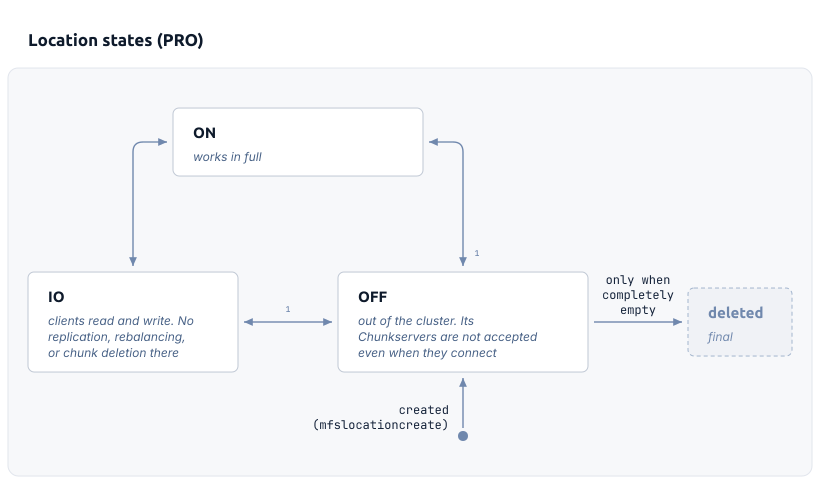
- The default location cannot be switched OFF. Promote another location to default first (
mfslocadmin setdefault).
Why it matters
A location is the unit that MooseFS places data in, and the unit that you can take out of service. A Storage Class defines placement per location, so one class can keep a different number of copies, or a different format, in each location. Switching a location to OFF takes a site out of the cluster when that site is down for maintenance or cut off by a network failure. The rest of the cluster keeps working while that location is OFF. The Master Server refuses that switch for two locations: the default location and the location that the Leader runs in. Taking a site out of service says what to do first in each case.
How MooseFS implements it
The Master Server holds the location names, the location states, the default location, and the mapped address ranges in its metadata. The division is therefore the same on every Master Server in the cluster. The Leader resolves the address of a module to a location when that module connects. The Leader logs a notice when the address is not mapped to any location. Redundancy is then maintained per location. The Master Server reviews the copies and parts of a chunk once for every location, against the definition of that location. The Master Server skips the locations that are not ON. The Master Server never uses space in one location to satisfy the definition of another location. When a location is asked for copies but has no Chunkservers to hold them, its own redundancy matrix therefore counts those chunks as missing. The matrix for all locations marks the same chunk as endangered, because copies of the chunk exist in another location. In that matrix, missing means chunks that are lost everywhere. Reading a cluster location by location says where each of those readings is found.
Related tasks
- Divide a new cluster into locations: the division that you set up before any data is written to the cluster.
- Location tasks: dividing a running cluster, and every later change to the division.
- Data placement tasks: giving a Storage Class a definition per location.
Related terms
- Chunkserver: the component that a location needs to store data.
- Storage Class: the policy that defines placement separately for each location.
- Topology: the separate mechanism that describes network distance between machines.