Maintenance mode
Maintenance mode is a state of one Chunkserver. The mode tells the Master Server that this server's absence is expected, so the cluster waits instead of rebuilding redundancy.
What it is
Maintenance mode is a state that the Master Server keeps for each Chunkserver. The state says that this server is expected to be unavailable for a while. The mode records intent, not a condition of the machine. The Chunkserver is never told about the state. The state stays with the Master Server whether the Chunkserver is running or down.
Maintenance mode can be entered in two ways. The two ways differ in how long the cluster waits. The Chunkserver enters temporary maintenance mode on its own. When the Chunkserver process is stopped in a controlled way, the Chunkserver tells the Master Server that the Chunkserver is leaving on purpose. Temporary maintenance mode covers a restart or an upgrade. The mode clears itself as soon as the server reconnects. The mode also expires on its own after a set period. After that, the Master Server treats the absence as a failure and starts rebuilding. You set maintenance mode by hand instead for work that you cannot time, such as a disk swap, hardware service, or moving a machine. You set it from the GUI or from the command line. Manual maintenance mode does not end when the server reconnects. It ends when you clear it, or when a time limit that you have set for it runs out. One more time limit applies in every case. A Chunkserver that stays disconnected is dropped from the cluster's records altogether after CS_DAYS_TO_REMOVE_UNUSED, seven days by default. The maintenance state is dropped with the Chunkserver. A Chunkserver that is killed, loses power, or loses the network enters neither mode, because nothing announced its departure.
Why it matters
A Chunkserver taken down on purpose and a Chunkserver that has failed look the same from the outside. The chunks that the absent server held are short of copies or erasure-coded parts, so the cluster rebuilds them elsewhere to restore their Redundancy Level. Rebuilding is the correct answer to a failure. For a planned restart, rebuilding is pure waste. The copies are rebuilt, then the server reconnects with its chunks, and then the surplus is deleted again. Use maintenance mode to tell the two cases apart.
The suspension reaches beyond the one server that you are working on. While that server is disconnected under the mode, repairs stop for every chunk in the cluster, not only for the chunks that the server holds. In a cluster divided into locations, the suspension covers the server's location instead. A copy lost elsewhere in the meantime leaves its chunk undergoal or endangered. The chunk stays that way. Uneven disk usage is not rebalanced away. Because of that reach, maintenance mode is a state that you undo. A server left disconnected under maintenance also costs more than it seems. Until someone clears the mode, no repair within that reach runs.
How MooseFS implements it
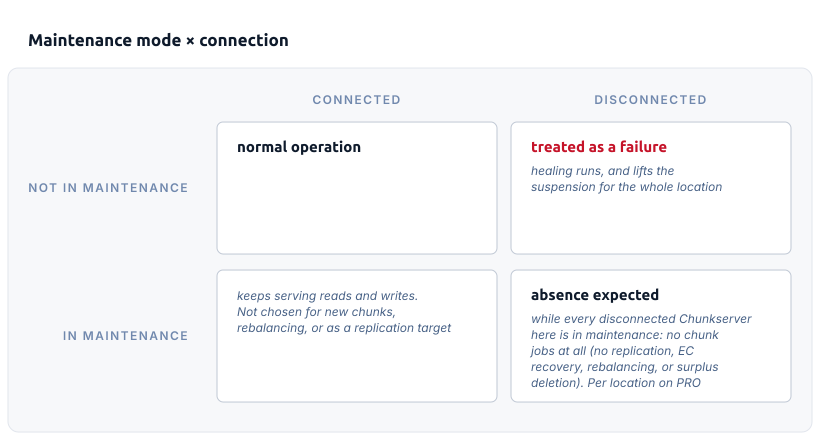
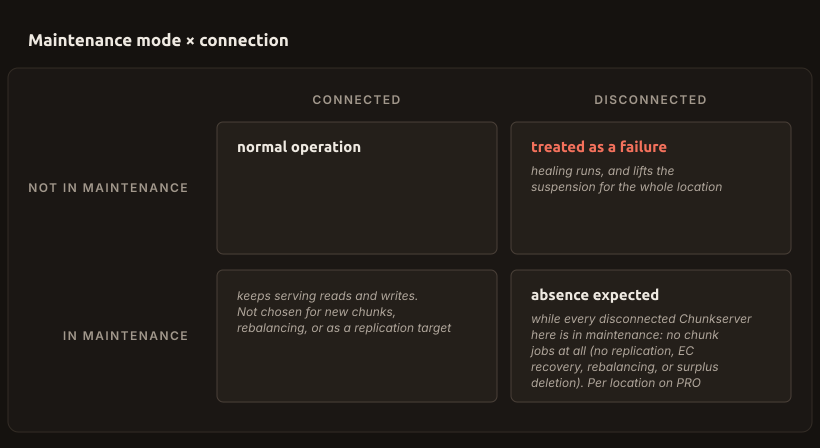
The suspension follows from a condition that the Master Server checks, not from the mode alone. As long as at least one Chunkserver is disconnected and every disconnected Chunkserver is in maintenance mode (manual or temporary), the Master Server schedules no chunk jobs. This stops replication, erasure-coding recovery, rebalancing, and the deletion of surplus copies. A single disconnected Chunkserver that is not in maintenance mode is enough to lift the suspension. In an instance divided into locations PRO (PRO Edition only), both the condition and the effect are counted per location. Otherwise they cover the whole cluster. Only work that a client is waiting for still runs. Recovery needed to make a chunk readable or writable is carried out regardless.
A lookup of a file counts as such work. The Master Server expects a lookup to be followed by an open, so it prepares the first chunk of the file in advance. If that chunk is erasure-coded and some of its data parts are missing, the Master Server restores the chunk to its Redundancy Level at once. Since 5.2.0, a lookup does not do this while the suspension holds for the whole cluster. Only a read or a write of the chunk does. In an instance divided into locations PRO (PRO Edition only), a lookup still restores the chunk while the suspension holds in some locations only. Up to 5.1.0, the lookup restores the chunk even in maintenance mode. A command such as mfsfileinfo * makes the kernel look up every file that the pattern names, so on those versions, checking the suspension with such a command shows repairs that maintenance mode does not stop. Read the state of chunks from mfscli or the GUI instead.
A Chunkserver that is in maintenance mode but still connected suspends nothing. It keeps serving reads and writes. The Master Server only stops choosing it for new chunks and as a target for replication. The Master Server drops even that restriction if too many Chunkservers would be excluded at once.
Two ways in. A clean stop announces the temporary mode, which clears on reconnection and expires on its own. The manual mode is set from the GUI or CLI. That mode ends only when someone lifts it, or at its own time limit.
Work that a client is waiting for always runs. A server that stays disconnected for CS_DAYS_TO_REMOVE_UNUSED (7 days) leaves the register together with its state.
Maintenance mode × connection. Repairs are suspended only when the Chunkserver in maintenance is also disconnected. A connected Chunkserver in maintenance keeps serving reads and writes. Read the grid as two questions asked together: neither the mode nor the connection decides on its own what the cluster suspends.
Maintenance mode has no effect on leader election PRO (PRO Edition only). A disconnected Chunkserver in maintenance mode counts against the Leader's majority exactly as a failed Chunkserver does.
Maintenance mode is not the way to retire a server permanently. A server that will not return is removed from the cluster. First, move the data off the server by marking its disks for removal, with the * prefix in mfshdd.cfg. Leaving a retired server disconnected and under maintenance does the opposite of what it seems to do. Until someone clears the mode, no repair runs in that server's location, or in the whole cluster.
Related tasks
Related terms
- Chunkserver: the component that the state belongs to.
- Master Server: the component that holds the state and acts on it.
- Redundancy Level: what the suspended jobs restore.
- Location: the scope that the suspension reaches.
- Self-healing: the work that maintenance mode suspends.
- Leader election and quorum: the majority that the mode does not change.