Changelogs, dumps, and the recovery point
The Master Server holds metadata in RAM. This page describes how that structure is stored on disk: what is written, when, what a startup reads back, and how much work a sudden failure costs.
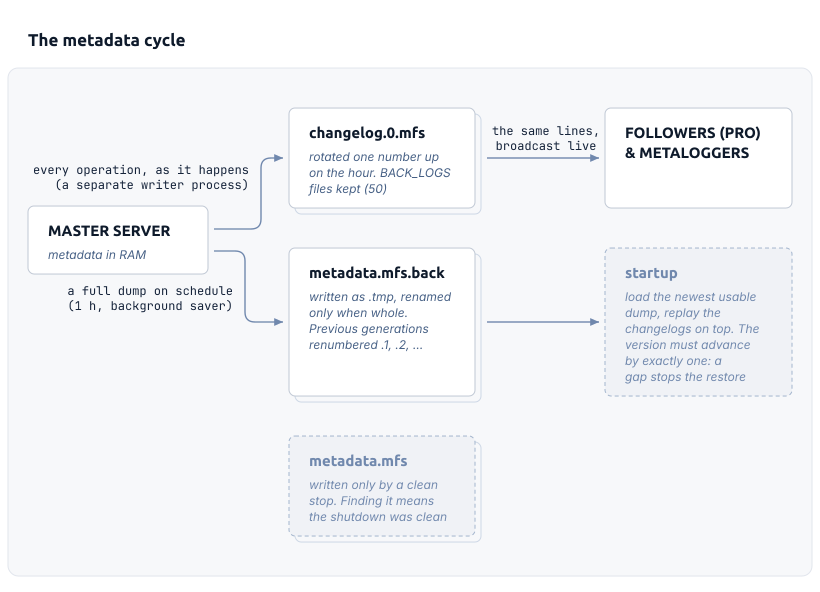
On PRO the Leader does not dump on schedule itself: its synchronized Followers take the scheduled dump, and the Leader only its own, on the CRC-check schedule (24 h).
Recovery point: BACK_LOGS hours of changelogs must cover the oldest dump kept.
A periodic dump and a running changelog
The dump and the changelog are both stored in the data directory of the Master Server. DATA_PATH in mfsmaster.cfg sets the path to this directory.
The dump is a complete copy of everything the Master Server keeps at one moment. A save writes metadata.mfs.back.tmp and renames it to metadata.mfs.back only after the whole structure is in the file. A save that stops halfway therefore never replaces the existing dump. A completed save does not delete the dump that it replaces. The save renumbers the old dump (metadata.mfs.back.1, metadata.mfs.back.2, and upwards) for as many generations as BACK_META_KEEP_PREVIOUS allows.
A Master Server that is stopped rather than killed writes one more dump when it terminates. This save needs one rename more than an ordinary save. The dump is written to metadata.mfs.back.tmp first and becomes metadata.mfs.back only after it is complete. The terminating server then renames that file to metadata.mfs. The Master Server never writes to a file under the final name. It gives that name only to a file that is already complete, and this is why the name has a meaning. The next startup loads metadata.mfs and renames it back to metadata.mfs.back, so finding metadata.mfs in the directory means that the last shutdown was clean.
The changelog records what happened between dumps. The Master Server appends to changelog.0.mfs and rotates the file on the hour. A rotation increases the number of every file by one, overwrites the file that already has the number BACK_LOGS, and starts a new changelog.0.mfs. One numbered file therefore covers one hour of operations, whatever the dump schedule is. A terminating Master Server rotates as well, so the last file is closed rather than left open.
A changelog line is text, with the identifiers
A line has the form <version>: <timestamp>|OPERATION(arguments). The version is the number of the change. It orders the lines against each other and against a dump. The timestamp is the wall-clock second in which the operation happened. Names appear in the arguments as text. Every ,, %, (, and ) in a name, and every byte outside printable ASCII, is written as % and two hexadecimal digits.
Many operations append one more value after the closing parenthesis. That value is the purpose of the format. Operations that change the tree, among them CREATE, SYMLINK, UNLINK, and MOVE, append the inode number that the operation ended up with. That number is the one allocated for a new node, or the one that the named entry turned out to have. WRITE and TRUNC append the chunk ID. Whatever replays the line derives that identifier the same way and then compares it with the identifier in the line. A difference aborts the replay instead of being carried forward.
Two consecutive lines show the whole mechanism:
90623: 1787623216|CREATE(1377,run-0.tmp,1,438,18,0,0,0):5566
90625: 1787623216|WRITE(5566,0,1,0):9557
CREATE names the parent inode and the file name, and appends the inode that it assigned, 5566. The WRITE two versions later names that inode rather than the path, and appends the chunk ID that it assigned, 9557.
The check is needed because later operations name inodes and chunk IDs, not paths. Suppose a copy of the metadata assigned inode 27 where the original assigned 26. That copy would then apply every later operation to the wrong object. The operations themselves would not reveal the error. Comparing the identifier turns the error into an immediate, loud failure. The Master Server also sends the same lines onward. A Metalogger uses them to keep a second copy of the metadata current.
A line reaches disk when the operation happens
The Master Server logs an operation while it applies the operation. Before the operation finishes, the Master Server raises the metadata version, formats the line, and passes the line to the writer. Nothing waits in RAM for the next save. The dump schedule does not affect how much work is at risk.
CHANGELOG_SAVE_MODE sets what passing the line to the writer means in practice. In the default mode, a separate process appends the line to changelog.0.mfs. The Master Server does not wait for that process. In mode 1, the Master Server writes and flushes the line itself before it continues. In mode 2, the Master Server also calls fsync() for every line, so each operation is on stable storage before the next one starts.
The recovery point follows from this setting. It is measured in operations rather than in hours. Mode 2 leaves nothing at risk. It costs one synchronous disk write per metadata operation. Unless the storage handles synchronous writes well, this write limits the rate of the Master Server. Mode 1 leaves at risk what the operating system has not yet flushed. The default mode leaves the same at risk, plus whatever the writer process has not yet received. In exchange, a slow disk delays the writer rather than the Master Server. In the default mode, the writer also syncs the file before each hourly rotation. At every hour boundary, everything older than that boundary is therefore on the disk.
A startup loads a dump, then replays changelogs
A startup does not normally replay changelogs. Without the automatic-restore option (-a), the Master Server reads one file, metadata.mfs. It refuses to start when that file is missing or damaged. The file is missing after any stop that was not clean, because only a clean stop writes it. The exceptions are the empty image that a fresh installation starts from and the file that an offline mfsmaster restore leaves behind.
With automatic restore, the Master Server scans its data directory for every file name that begins with metadata. It checks each candidate for a valid signature and for the marker that ends a complete dump. It reads the metadata version from each candidate that passes and loads the candidate with the highest version. When the candidates have more than one metadata ID, the startup stops rather than mixing them. The -i flag overrides that check. The highest version is then loaded regardless of its ID. The same scan also handles a corrupted newest dump. A truncated or unreadable metadata.mfs.back fails the check and is not chosen. The previous generation is loaded instead.
The Master Server then applies the changelogs on top of the dump. It takes every changelog.N.mfs, changelog_ml.N.mfs, and changelog_ml_back.N.mfs that it finds. Because of this, the files of a Metalogger can restore a Master Server. The Master Server discards each file whose last line is older than the loaded dump, and each file whose first line it cannot read. It merges the remaining files into one stream ordered by metadata version. Overlapping files are therefore harmless. A version seen twice is applied once. Every line is applied in order. After each line, the metadata version must have increased by exactly one. A gap in the numbering stops the restore rather than being skipped over. The versions missing from the middle are operations that happened. Metadata reassembled without them is therefore not the metadata that the cluster had.
Changelog retention must outlast the oldest usable dump
The dump loaded at startup is not always the newest one. A changelog file that still exists must cover every hour between the dump and the present. Because one numbered file holds one hour, the check compares two numbers: BACK_LOGS and the age in hours of the oldest dump that you keep.
That age is a product of two options. METADATA_SAVE_FREQ sets the hours between saves. BACK_META_KEEP_PREVIOUS sets how many older generations are kept. The age of the oldest dump is therefore the product of those two values plus the time since the last save. The mfsmaster.cfg reference gives a save every hour and one previous generation as the values of those two options. With these values, the oldest dump is at most two hours old. The changelogs cover fifty hours.
An installation with several Master Servers PRO (PRO Edition only) has much less of that margin. As long as one Follower is synchronized, the Leader does not save on that schedule. A Leader with no synchronized Follower falls back to saving the way a single Master Server does, and reports this in its log. Instead, at each METADATA_SAVE_FREQ interval, the Leader has its synchronized Followers store the dump. The Leader writes its own dump only on the METADATA_CRCCHECK_FREQ schedule, 24 hours by default. The oldest dump in the Leader's own directory is then up to 48 hours old. The default of 50 changelog files is sized for this case.
The Master Server enforces part of the relationship itself. A METADATA_SAVE_FREQ larger than half of BACK_LOGS is cut to half of BACK_LOGS when the configuration is read. METADATA_DOWNLOAD_FREQ and METADATA_CRCCHECK_FREQ are cut the same way. The check does not cover BACK_META_KEEP_PREVIOUS. If you raise it, you must do the arithmetic for the older generations yourself.
A Master Server that cannot write metadata stops
A save may fail to be written to its normal location (no space left, an I/O error, a directory that has turned read-only). The saving process then falls back to an emergency copy named metadata.mfs.emergency. The saving process tries the data directory first. It then tries the home directory of the user that the Master Server runs as. After that, it tries a fixed list of directories: the root directory, /tmp, /var, /usr, and several paths below /usr. The first location that accepts the file ends the attempt. An emergency copy written in the data directory counts as a candidate at the next startup. One written anywhere else is read only after the scan of the data directory has found a dump with a metadata ID. It is used only when it has that same ID and a higher version.
Whether the emergency copy succeeds or not, the Master Server exits. It does not exit at once. It retries the ordinary save every ten seconds and exits only after one of those retries succeeds. If space is freed in the data directory in the meantime, the process therefore still writes a proper dump and then stops. If the directory stays unwritable, the process stays in that loop. The Master Server also exits in the same way when the writer reports that a changelog line could not be appended.
The stop is deliberate: it decides who notices the failure. Suppose a Master Server kept serving clients while its metadata could not be written to disk. It would hide the failure for as long as it stayed up. Every hour of this situation makes the newest usable dump an hour older. The stop turns a silent problem into an outage when the problem starts. At that moment, the last dump is still recent. The save states describe what the Master Server reports about its own last save, and which of the four outcomes that save had.