Disk error handling and disk removal
A Chunkserver reviews its disks one at a time. A chunk that fails a check costs the cluster one copy. A disk that the Chunkserver takes out of use costs the cluster every copy stored there at once. This page covers how many errors a disk is allowed before it is taken out of use, and what happens to the copies that were on it. The page also covers how a disk that you want to retire leaves the cluster without any chunk losing redundancy.
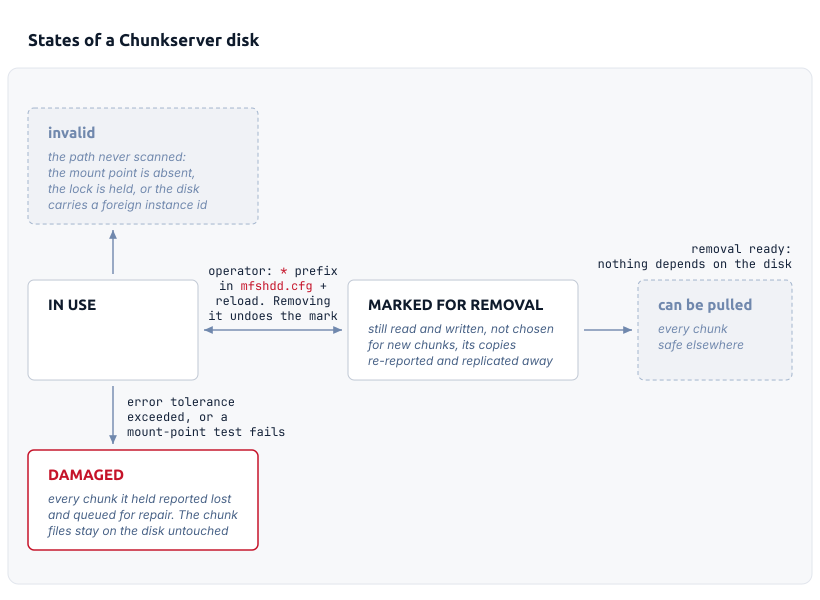
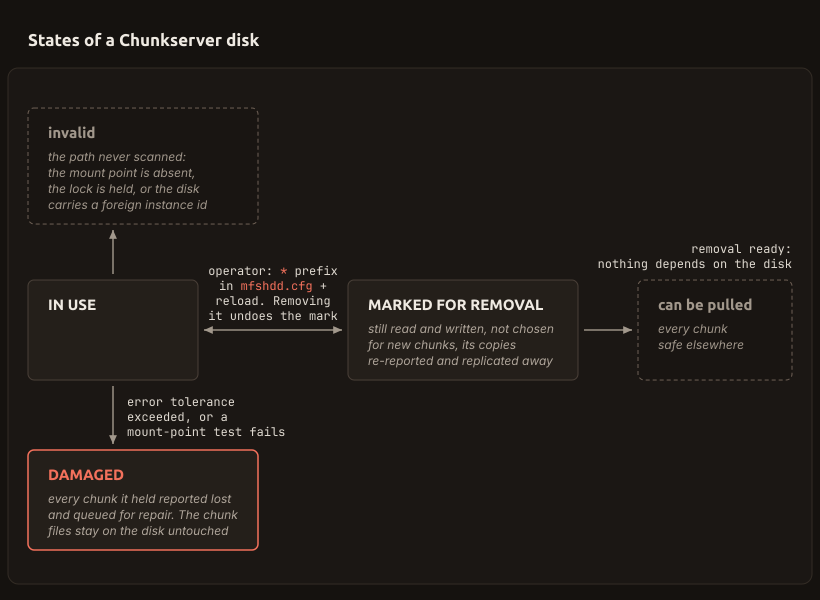
Only I/O errors, a read-only file system, and a vanished chunk file count toward the tolerance, over the last 30 records for that disk. A checksum that does not match reports one chunk, so the disk keeps working.
Clearing the note about the last error resets the counter (CS ≥ 4.33).
Every failed operation is recorded on its disk
A failed operation on a chunk file leaves a record on the disk that holds the file. The record contains the chunk ID, the error that the operating system returned, and the time. Each disk keeps the last thirty of these records and a running total of everything it ever recorded. The Disks tab of the GUI and mfscli -SHD report the newest record as the last error, next to the chunk it happened on. The Chunkserver tells the Master Server that an error occurred, so the count is visible per server as well.
Not every record counts toward taking the disk out of use. The records that count are an input/output error and an error returned because the file system has turned read-only. A chunk file that is no longer where the Chunkserver expects it also counts. A checksum mismatch is handled separately. It makes the Chunkserver report that one chunk to the Master Server as damaged. The copy stops counting, but the disk stays in service. Scrubbing and block checksums covers what the Chunkserver checks before it calls a copy bad.
HDD_IO_SECONDS_TO_ERROR in mfschunkserver.cfg adds a case that is not a failure at all. With the option set, an operation on a chunk file leaves a record when the operation takes longer than the given number of seconds. The record is written even when the operation succeeds. The client that waits for the operation is told nothing. The record makes the hang visible. Since 5.2.0, such a record counts toward the tolerance like an I/O error, so a disk that keeps hanging is taken out of service. Up to 5.1.0, the record does not count. The option is off by default.
Records do not age out. A new record overwrites the oldest of the thirty. Age matters only in what the tolerance counts. Dismissing the last-error notice for a disk from the Disks tab clears more than the display. The dismissal discards every record that the disk holds and resets the disk's total, so the counting starts from zero. The tab offers that dismissal only when the disk is not marked damaged and the Chunkserver is at 4.33 or newer.
Exceeding the tolerance retires the whole disk
The Chunkserver reviews its disks once a second. For each disk, the Chunkserver counts the records that are younger than HDD_ERROR_TOLERANCE_PERIOD seconds and are of a kind that counts. The Chunkserver then compares that number with HDD_ERROR_TOLERANCE_COUNT. The comparison is strict: a number of errors equal to the tolerance leaves the disk in service. Only a number above the tolerance takes the disk out. With the defaults of 2 and 600, two errors inside ten minutes change nothing. A third error inside the same period takes the disk out of service.
Both options are read again on every reload. Both options are clamped when they are read. The count is held between 1 and 10. The period is held between 10 seconds and one day. A value outside either range is replaced by the nearest value inside that range, with a note in the log. At a count of 1, the second error inside the period takes the disk out.
A disk that is marked damaged does not keep working with that mark. The change happens in one step. The disk stops being a candidate for new chunks. Its space and chunk count leave the totals that the Chunkserver reports. The Chunkserver tells the Master Server that every chunk that the disk held is lost. The Master Server removes those copies from its record of each chunk. As a result, the chunks are short of redundancy, exactly as they would be after a whole Chunkserver fails. The Master Server then queues those chunks for repair. The order in which that queue is worked through, and the limits on its speed, are set by replication priorities.
Nothing is deleted. The chunk files stay on the disk untouched. That is why recovering them is possible at all. The disk also stays in the configuration and keeps its row in the disk list, flagged damaged. The disk's usage in that row is refreshed about once a minute.
Some conditions mark a disk damaged with no errors
Some checks run against the mount point rather than against the chunks on it. Each of these checks marks the disk damaged on its own.
- The Chunkserver cannot read the file system statistics for the path at all.
- The total size that the file system reports falls below nine tenths of the previous reading, or rises above ten ninths of it. This check detects a disk that has been swapped, unmounted under the Chunkserver, or replaced by an empty mount point. The
~prefix inmfshdd.cfgturns this one check off for a path whose size legitimately changes. The size of a compressed file system changes that way. - The read-only flag of the file system changes in either direction. This check catches a file system that remounts itself read-only after an error.
Failing at startup is a further way. A disk without a valid index of its contents is scanned in full. On such a disk, the Chunkserver creates and tests the 256 directories that it stores chunks in. A directory that the Chunkserver cannot create or access stops the scan and marks the disk damaged. A configured path that never got that far is flagged invalid. The interfaces then show that flag. invalid is the state of a line in mfshdd.cfg that has no working disk. A path is flagged this way when the mount point is absent or when the lock file cannot be written. The same flag appears when another process holds the lock, or when the disk has the identifier of a different MooseFS instance.
A failure the system hides cannot be counted
Every one of these tests reads the disk through the operating system. A Chunkserver has no other way to detect a failure. A disk that fails in a way that its controller masks does not register. A controller in RAID mode can mark a block bad, complete the operation as a success, and report nothing. Neither the kernel nor the file system reports an error, so the Chunkserver has nothing to count. Instead of an error, the symptom is time: operations take far longer than they should. The hardware requirements for Chunkservers advise plain JBOD over RAID here. Keeping failures visible to the Chunkserver is one of the reasons. The boundary itself is deliberate. The Chunkserver uses only plain POSIX file operations, which are portable across every system that MooseFS runs on. The Chunkserver does not access controllers or hardware below the operating system.
Errors that do occur, but far apart, are the same problem in a milder form. The tolerance is a rate and not a total. A disk that produces one error every twenty minutes never has enough errors inside HDD_ERROR_TOLERANCE_PERIOD at once. As a result, the disk stays in service for as long as that rate lasts. Lowering HDD_ERROR_TOLERANCE_COUNT narrows that gap. With HDD_IO_SECONDS_TO_ERROR, an operation that hangs instead of failing at least leaves a record on the disk. Since 5.2.0, that record also counts toward the tolerance.
A single failing disk can affect more than its own server. That follows from how a write works. A modification has to reach every copy of the chunk. When a chunk has a copy on a disk that hangs, the modification of that chunk hangs with the disk. With enough such disks, most modifications in the cluster hang. Reads hang on such a disk as well whenever a mount's preferred labels point at the server that holds the disk, because the mount keeps choosing that server.
Marking for removal keeps copies readable but uncounted
Retiring a disk on purpose uses a different mechanism, with no error involved. Prefixing the disk's path with * in mfshdd.cfg marks the disk for removal. The Chunkserver acts on the change when it reloads its configuration.
The Chunkserver then reports its whole chunk list for that disk to the Master Server again. This time, the Chunkserver flags every entry as stored on a disk marked for removal. The Master Server records those copies as marked for removal instead of valid. Such a copy is readable. It is also a replication source of last resort. The Master Server uses a valid copy whenever a valid copy exists, and uses a marked copy only when none exists. A marked copy no longer counts toward the redundancy that the chunk requires. That is why the chunk goes into the repair queue. Chunk versions and states covers what the status means from the chunk's side.
On the Chunkserver, the disk stops being chosen for new chunks. Its space and chunk count move out of the reported totals into a separate pair of totals that the cluster keeps for disks marked for removal. Reads and writes to the chunks already on the disk continue.
The copies themselves are neither moved nor deleted. Marking is meant to make the cluster independent of the disk, not to empty it. A copy that nothing depends on costs only the space it occupies. There is one exception. It exists to unblock the repair, not to clean the disk. The exception applies when every Chunkserver that could receive a new copy of a chunk already holds one of that chunk's copies. The Master Server then deletes the marked copy to free the place. The Master Server does so only when the two queues for chunks down to one copy are empty.
Marking for removal is not rebalancing. The two mechanisms are separate. Internal rebalancing moves chunks between the disks of one Chunkserver. A disk marked for removal is excluded from rebalancing, both as a source and as a destination. Copies leave a marked disk over the network, on orders from the Master Server. The < prefix does empty a disk onto its local neighbors, but that prefix belongs to rebalancing and not to marking for removal.
A disk whose file system has turned read-only is the one case where marking for removal and the damage handling described above meet. Such a path cannot normally be brought into service, because the Chunkserver cannot write its lock file. A path marked for removal is accepted read-only. The chunks on it are opened for reading and remain available as replication sources. Nothing is written back. The error tolerance also does not apply to such a disk. Input/output errors on such a disk do not retire the disk. Only a chunk file found missing still marks the disk damaged.
A disk is ready when nothing depends on it
The Master Server answers whether anything still depends on the disk, not whether the disk is empty. The Master Server refreshes that answer at the end of every pass over its chunk table.
During a pass, a chunk that reaches its required redundancy only because marked copies are counted puts the Chunkserver that holds those copies into the in-progress state. A Chunkserver becomes ready at the end of the first complete pass in which no chunk put the Chunkserver into that state. The pass during which the last replication finished does not qualify, because the flag was set inside that pass. Readiness therefore always waits for the pass after the work. A Chunkserver that disconnects has its answer reset and goes through the same steps again.
| What the cluster reports | What it means |
|---|---|
removal not ready (validating) | The Master Server cannot say yet, because it has not finished measuring this server against a pass. A cluster into which no chunk was ever written stays here, because the pass over the chunk table never runs. |
removal not ready (in progress) | At least one chunk still reaches its required redundancy only because a copy on the marked disks is counted. |
removal ready | A full pass found no chunk in that position. Everything the disk holds is stored elsewhere as well. |
The answer is computed per Chunkserver and not per disk. Two disks marked on the same server therefore show the same value and turn ready together. The alerts reference lists the messages that the cluster shows next to these states.
Removing the line removes the disk
Marking is reversible and costs nothing to undo. Taking the line out of mfshdd.cfg removes the disk. A reload does the removal in one sweep. The Chunkserver provisionally flags every disk that it currently holds for removal. The Chunkserver then reads the file and clears the flag from every path that it finds. Finally, the Chunkserver drops whatever is still flagged.
To drop a disk, the Chunkserver reports each chunk on the disk to the Master Server as lost and then releases the disk. A chunk in use at that moment keeps the disk from being released. The sweep repeats until every chunk on the disk is free. The disk stays in the list meanwhile. A path that is put back into the file during its removal is refused until the removal finishes.
The Master Server treats that report exactly as it treats a damaged disk. For this reason, wait for the ready status before you take the line out. If the disk was ready, the copies that it gives up were copies that nothing depended on. No chunk changes grade. If the disk was not ready, the chunks that it held drop below their Redundancy Level and are rebuilt from whatever is left.
A disk dropped this way writes an index of its contents to the mount point as it leaves. Because of the index, adding the disk back later does not mean reading every directory again. A damaged disk skips the index, because the Chunkserver no longer treats what is on the disk as valid. A read-only disk skips the index as well, because the Chunkserver cannot write to that disk. A disk that still holds duplicates to remove also skips the index. All three are scanned in full when they return. The index is also ignored if the chunk directories have been touched since the index was written. For this reason, a disk that has been worked on offline is rescanned whether or not the index is still there.
Putting a line back and reloading clears the damaged flag together with the disk's error records. Unless the Chunkserver still holds that disk's chunk list in memory, the disk is scanned again before its chunks are announced.
Marking starts repair, but maintenance mode suspends it
Marking and maintenance mode both tell the cluster that hardware is about to be worked on. They ask for opposite responses. Maintenance mode suspends repair: it tells the cluster that a whole Chunkserver's absence is expected. Redundancy is therefore not rebuilt while the server is away. The server returns with its chunks. Marking a disk for removal starts repair: it tells the cluster to build a full set of copies elsewhere, because what is on this disk is not coming back. Maintenance mode fits a restart. Marking fits a retirement. The two mechanisms do interact. While every disconnected Chunkserver is in maintenance mode, the Master Server suspends repair. The suspension includes the replications that a marked disk elsewhere is waiting on. A marked Chunkserver that disconnects also has its readiness answer reset. In an instance divided into locations PRO (PRO Edition only), that suspension covers the location instead of the whole cluster. Marking makes progress only when no such suspension is in force.
A detached disk can be checked before it returns
A disk that has left the cluster still holds its chunk files. After a power failure or a file system repair, some of those files no longer match their stored checksums. mfschunktool reads chunk files directly, with no Chunkserver involved. The tool checks the files. In repair mode, the tool also writes. Repair recalculates the stored checksums from the data that is actually in the file, and fixes header fields from the file name. The tool refuses to run on a storage directory that a running Chunkserver has locked. That protection does not apply to a single file or a subdirectory, because the tool cannot detect the disk's real lock. Either way, use the tool on a disk that the cluster is not using.
The -m option names a directory to move damaged chunks into. What the option moves depends on whether repair is switched on at the same time.
| Combination | What is moved |
|---|---|
-m on its own | Every failing chunk the tool could open under a valid name. A file it could not open, or a file misnamed while -n is off, is reported but left in place. No chunk file is written to. |
-m together with -r | Only the chunks repair could not fix. A chunk whose header or checksums were corrected stays where it is. |
The combinations differ in who decides whether to keep a repaired chunk. Repairing in place recalculates checksums from data that may itself be wrong. The chunk then stops failing its check without becoming correct. Back in the cluster, the chunk looks the same as a copy that was never damaged. If a good copy of the same chunk exists on another Chunkserver, the repaired copy is the worse of the two. The cluster cannot tell them apart. Moving the damaged chunks aside instead keeps that decision open. The disk goes back with only the chunks that passed. The cluster rebuilds what is now missing from copies that never needed repairing. The files set aside are still there to be repaired later, if it turns out that no other copy exists.