Computation on storage nodes
A MooseFS instance can share hardware with other software. Chunkservers exist to store data. A Chunkserver needs little of its processor until traffic reaches it (the processor demand follows the traffic). A second job therefore makes sense for Chunkserver machines: the computation that reads and writes the data that those machines hold. Image analysis, rendering, model training, and scientific batch work all fit this deployment, because each of these workloads reads far more than it writes and reads the same files many times.
You gain a read that never leaves the machine, and a set of machines that you do not have to buy twice. The deployment costs you a second workload on hardware that the cluster depends on, and a placement problem. The cluster has no information about which machine will compute on which file, so you have to tell the cluster. The worked example below uses one cluster. Each section of the example covers one decision that this deployment requires.
Twelve machines compute, two do not
Twelve machines, each with a dozen data disks, run mfschunkserver and the batch jobs together. Each machine also runs one MooseFS mount. The machine's jobs reach the file system through that mount. Two further machines run the Master Servers and nothing else. The data is a few hundred thousand large input files that jobs read end to end, plus the results that the jobs write back to the same file system.
The Master Servers are kept off the compute machines on purpose. One process on one machine answers every metadata operation of every client in the cluster. A core taken from that process is therefore taken from all twelve nodes at once. The metadata that the process serves has to stay resident in RAM. Master Servers covers the sizing of that machine. Bare metal, virtual machines, and containers covers what each role needs from the platform that it runs on. Sharing a machine between MooseFS components is a separate decision with its own procedure: several processes on one machine.
Describe the workload in the terms that determine the size of the machines before pricing them (start from the workload). Nothing in this deployment changes that arithmetic. This deployment adds one term to it: whatever the jobs need for themselves, on top of what the Chunkserver and the mount need.
A read goes local only when you ask
Two sorting steps decide which Chunkserver a job reads from. Only one of them measures distance.
The Master Server sorts the copies of a chunk before it passes them to a client: nearer Chunkservers first, by topology distance. A Chunkserver registered under the same address that its machine's client connects from is at distance 0, the nearest value there is. If the mount and the Chunkserver of one machine use different addresses, that machine is no nearer than any other machine. Keep both on one address. This applies with no mfstopology.cfg in place at all. Without a map, every machine is in one rack. The only distances left are then 0 for the same address and 1 for any other.
Then the client sorts the list again. This second sort ignores distance. For a read, the client ranks each Chunkserver by the preferred labels that the mount was given. The client breaks ties by the number of operations that the mount already has running against each server. A mount with no preferred labels gives every server the same rank, so the tie-break decides alone. The Master Server's order then has no effect. The local copy is then read when it happens to be picked, not because it is local.
The locality that this deployment exists for is therefore not a property of the cluster. Locality is a preference that you state on the mount and a placement that you state in a Storage Class. The preference and the placement have to match each other.
Labels pin data to its reader
A label is the only name that the class and the mount share. The class says which labeled servers hold a copy. The mount says which labeled servers it reads from first. Give each Chunkserver a letter of its own with LABELS in mfschunkserver.cfg, A through L for the twelve machines.
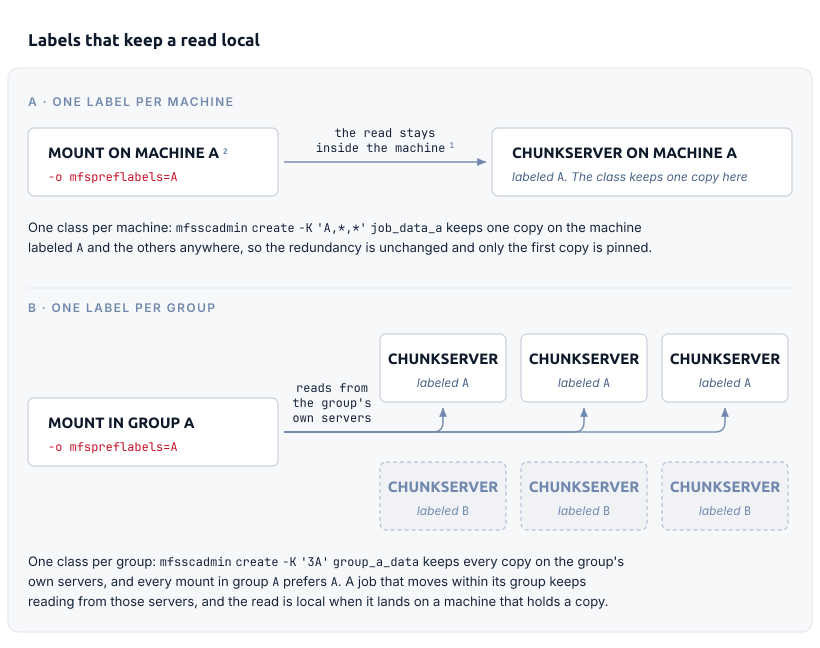
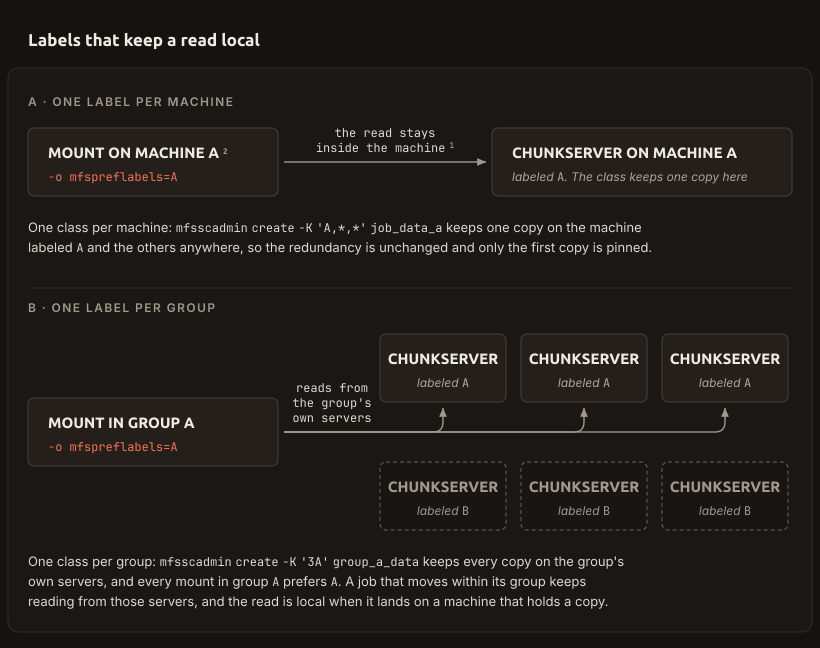
Where each machine runs one job on a data set of its own, define one class per machine. Each class keeps one copy on that machine and the remaining copies anywhere. The redundancy is therefore unchanged. Only the first copy is pinned (mfsscadmin):
mfsscadmin create -K 'A,*,*' job_data_a
mfsscadmin create -K 'B,*,*' job_data_b
Set the class with mfssetsclass on the directory that each job works in, before the files are written. An object takes its class from the directory that it is created in (how policies are applied):
mfssetsclass -r job_data_a /mnt/mfs/jobs/a
Then mount each machine so that the mount prefers the machine's own letter (mfsmount):
mfsmount /mnt/mfs -o mfspreflabels=A
The job on machine A now reads its inputs from the disks in machine A. Every byte of that read stays inside the machine.
This layout costs bookkeeping. There is a class per machine. The directory that a job works in decides which machine reads the files locally. The scheduler that assigns work to machines therefore has to match the layout on disk. A job placed on the wrong machine still runs and still reads correctly. The job then reads over the network.
Where jobs move between machines, label groups instead of machines. Divide the twelve into groups of at least the copy count, label every server in a group alike, and keep all copies inside the group:
mfsscadmin create -K '3A' group_a_data
Every mount in group A prefers A. A job that moves within its group keeps reading from the group's own servers. When the job happens to run on a machine that holds a copy, that read is local as well. The locality is weaker. The scheduling is free.
- The mount uses its preferred labels to rank each Chunkserver. The mount breaks a tie between two servers by how many operations it already has running against each of them. Distance plays no part in this sort.
- A mount with no preferred labels gives every server the same rank. The local copy is then read when it happens to be picked, not because it is local.
The Master Server sorts the copies of a chunk by distance and passes the sorted list to a client. The mount sorts that list again. The second sort ignores distance.
A chunk stored in Erasure Coding is read part by part from the servers that hold the parts. Preferred labels play no role in that read.
New chunks are created near the writer when distance counts
Results are written on the machine that computed them. The same distance that the Master Server uses for reads can also affect where the chunks of those results are created. CREATIONS_RESPECT_TOPOLOGY in mfsmaster.cfg is 0 by default. The option promotes every candidate whose distance from the writing client is smaller than the value that you set. Set it to 1 and the only distance that qualifies is 0: the Chunkserver on the machine that is writing. Higher values promote whole racks and mean nothing without a topology map. 1 works without one.
The promotion is an ordering, not a filter. Candidates further away are moved down the list rather than removed. A write whose local Chunkserver is full, busy, or ruled out by the class therefore still succeeds elsewhere. Allocation and space selection covers that choice in full.
Placing the first copy locally shortens the write path. The machine still sends the same amount of data over the network. The client sends the data once, to the first Chunkserver of the chain. That server forwards the data to the next server. With the local Chunkserver first in the chain, the first hop stays inside the machine. The machine's network interface still carries the copies onward. That is exactly what the interface carried before.
Erasure Coding costs the local read
A chunk stored in Erasure Coding is not read the way a copy is. The parts are stored on separate Chunkservers. The client reads every data part, each from the server that holds it. Preferred labels play no role in that read. At most one of four or eight parts is on the local machine, so the rest of every read crosses the network whatever the labels say. Writing costs more still: a write to a chunk held as parts first waits for the cluster to join those parts back into whole copies.
Erasure Coding is therefore a question of when, not whether. Keep data in copies while jobs are computing on it, and let it become parts once the jobs are finished:
mfsscadmin create -K 'A,*,*' -A '@8+2' -o c -d 1d job_results_a
The class keeps three copies while the file is new. The class rewrites the chunks as eight data parts and two parity parts PRO (PRO Edition only) once a day has passed since the file's last inode change. -o c names the timestamp that the delay is measured from. -d sets the delay, whose smallest unit is one hour. -o f in place of -o c -d 1d converts as soon as the cluster reaches the file. That suits input data written once and then only read. For results that need not be kept when a job is interrupted, the opposite is reasonable: fewer copies and no archive step, -K '2*' or even -K '*'.
Figures counted elsewhere decide whether that archive step is affordable. The space and the repair work that each format costs are compared in choosing between copies and Erasure Coding. Chunkservers needed for an Erasure Coding scheme covers how many Chunkservers a scheme needs before the cluster will use it. That count leaves no spare machines on a cluster this size: converting chunks into @8+2 parts needs every one of the twelve machines. A node offline for maintenance therefore pauses the conversion until the node returns.
Jobs and the Chunkserver compete for one machine
The Chunkserver needs little of the machine when idle and a great deal of it under load. The Chunkserver serves clients and background work from pools of worker threads that spread across every core that the machine has. The Chunkserver also needs RAM in proportion to the number of chunks that it holds. Chunkservers lists both figures. The mount beside the Chunkserver keeps caches of its own on top of that (client cache and read-ahead). The jobs are the third demand on the machine. Of the three demands, nobody sized the jobs.
If the Chunkserver gets too few resources, the cluster reacts, visibly and by design. With enough of the server's workers busy at once, the server reports itself overloaded to the Master Server. The server keeps that state until its queues fall well below the threshold that set the state. While the state holds, the server takes no new chunks and is left out of ordinary repairs. The queue states in the GUI cover the state and the thresholds that trigger it. Allocation and space selection and replication priorities cover what the Master Server does with such a server. A cluster whose nodes are in that state day after day stores and repairs on fewer machines than it has.
A preferred label outranks all of this. Label rank is the stronger key in the client's sort. A mount that prefers the local label therefore keeps reading from the local Chunkserver however long that server's queue is. Locality and load balancing conflict here. You have chosen locality.
Fix this on the job side, not on the storage side. Cap what the jobs may take, in cores and in memory, and leave the Chunkserver headroom rather than letting the jobs take what the Chunkserver needs. Raising the worker limit in mfschunkserver.cfg changes the threshold, not the hardware. Watch the queue state per Chunkserver and the alert that the cluster raises for it, both covered in what to watch. A node that is consistently the busiest is the node whose jobs are oversubscribed.
The queue also answers the question in the other direction. A growing Queue on a machine that is running jobs beside its Chunkserver shows that the Chunkserver is no longer keeping up with its own work. Next, find out which resources the Chunkserver is short of. Stop the jobs on that machine. A queue that falls confirms the diagnosis. A queue that stays at the same level means that the cause is somewhere else. Either way, a queue that grows for longer than a moment is a problem, on this deployment and on any other.
Speed differences between machines do not average out, either. Placement takes no account of how fast a server is. A node slowed by its own jobs therefore slows every operation that touches a copy that the node holds. Mixing hardware explains why.
A rebooting compute node is a departing Chunkserver
Compute machines are restarted for reasons that storage machines are not: a driver, a kernel, a framework upgrade, a stuck job. Each restart takes a twelfth of the cluster's disks offline.
Stopping the Chunkserver in a controlled way announces the departure. The Master Server then delays repairs for a limited period instead of rebuilding at once (maintenance mode). The same page covers the manual form for work that you cannot time, and the limits on both forms. A node that is killed, loses power, or loses the network announces nothing. The cluster treats the node as a failure: copies of every chunk that the node held are rebuilt elsewhere. That traffic reads and writes across the machines that the jobs are running on.
Keeping the copy count above one is therefore not a formality in this deployment. A class of -K '*' on data that a job cannot recompute means that the data is lost with the node. The node is a machine that you plan to restart.
When one mount is not enough, link libmfsio
A single mount has a throughput ceiling set on the client machine, not by the cluster (the per-mount throughput ceiling). Every operation costs a FUSE layer crossing before anything leaves the machine. A compute node with a dozen local disks can need more than that.
Several forms of the client solve this. Clients describes each of them. Several mounts on one machine each open a channel of their own (multiple mounts and parallel access). libmfsio links the cluster into the program itself, with no mount point and no FUSE layer. Use libmfsio when the ceiling limits the job. MooseFS Block Device (mfsbdev) presents one stored file to the machine as a block device, for jobs that need a device rather than a file system. All forms of the client state preferred labels the same way, so none of them loses the locality that this deployment depends on.
If the jobs run in containers, the platform decides how much of this still applies: a container shares the host's kernel and competes for the host's resources. A Chunkserver in a container still needs its disks whole and directly attached (bare metal, virtual machines, and containers). Under Kubernetes, the CSI driver creates the mount for the pod. Pinning a pod to the node whose label the pod's mount prefers is a scheduling task on the Kubernetes side.