Cluster health problems
The cluster grades its own data. This page starts where that grade is something other than stable. The page goes grade by grade, in the order the grades need attention: what to check, what to do, and how to tell that the cluster is back to normal.
Self-healing explains what each grade means. Cluster health parameters covers what each figure counts, how current it is, and where to read it. Replication priorities covers which repair the Master Server takes first and how fast it is allowed to run.
Read again when the counters may be invalid
mfscli -SIC
While Chunkservers are connecting or disconnecting, mfscli opens the chunk matrix with a warning that the counters may not be valid. The GUI raises an alert that says the same. Do not apply anything on this page to a reading taken while that warning is shown. The numbers describe a set of copies that is still changing while Chunkservers connect and disconnect. The state is ordinary after a restart of the cluster and after a Leader election PRO (PRO Edition only). Wait for the Chunkservers to finish registering and read again. If the warning has not cleared within a few minutes, contact MooseFS support.
Bring back whatever held the missing chunks
missing is the only grade that waiting does not improve, so everything that follows from it is work you do. The sooner you start, the better.
Start with the servers rather than with the files:
mfscli -SCS
A Chunkserver that is disconnected rather than dead is the only cause of missing that resolves itself. The cluster reports this. While any Chunkserver is unreachable, the cluster adds a note to the missing report that the data may be available again once that server reconnects. Bring back every server and every disk you can. As each server and disk registers, the copies it holds are counted again. Chunks that were missing become ordinary chunks.
Do not reinstall, reformat, or reuse a disk or a server while missing stands. Those disks still hold the missing data. Once they are wiped, there is nothing left in the cluster to repair from.
Once everything that can reconnect has reconnected, list the files:
mfscli -SMF
Each row is one missing chunk, with the path of the file it belongs to and the type of the loss. The type says what is left of the chunk and therefore what you can try. The types are described in chunk versions and states. The list comes from the file loop, not from the live counters. Confirm anything you take from the list against the matrix before you act on it.
What is left of a chunk decides where the chunk can be recovered from. A chunk whose copies are on hardware you can bring back is available again when that hardware reconnects. That case resolves itself the moment the server registers. A chunk left with copies that are readable but not current, or readable and inconsistent, is a candidate for repair one file at a time. Chunkserver and disk recovery covers that repair. A chunk with nothing left anywhere is restored from a backup outside the cluster or not at all.
Stop writes to the affected data while you work: disconnect the clients that use it, or stop the jobs that write to it. Every write during the repair adds a version to reconcile.
Back to normal: missing in mfscli -SIC reads zero.
Endangered chunks can still be saved, so add nothing
An endangered chunk can still be saved. The cluster is already working on it. What happens around the chunk while that work runs decides whether the count goes to zero or to missing.
Here, the actions to avoid matter more than the actions to take. Do not take another Chunkserver down, do not start hardware work you had planned, and do not put a server into maintenance mode. While at least one Chunkserver is disconnected and every disconnected Chunkserver is in maintenance mode, the Master Server schedules no chunk repairs at all. In a cluster divided into locations PRO (PRO Edition only), both that condition and the suspension it causes are evaluated per location. Only the work a client is waiting for still runs. If you can keep clients off the cluster until the repair finishes, do so.
A second failure while chunks are endangered turns them into missing chunks. That is data loss the cluster cannot undo. Planned work on any Chunkserver waits until the endangered count reaches zero.
To speed up the repair, remove what slows it down, in this order. Reconnect any disconnected Chunkserver, because its copies are counted again as soon as it registers. Make room on the servers that can receive a copy, because a Chunkserver with almost no free space left is not chosen as a destination at all. Raise the first position of CHUNKS_WRITE_REP_LIMIT and of CHUNKS_READ_REP_LIMIT in mfsmaster.cfg. That first position applies to chunks with no redundancy left. Then apply the change:
mfsmaster reload
Raising those limits adds read load on the servers that hold the surviving copy and leaves less bandwidth for clients. Put the limits back when the count has fallen.
Back to normal: endangered falls between two readings of mfscli -SIC and reaches zero.
A falling undergoal count is the cluster working
An undergoal count is the ordinary sign of a cluster repairing itself, so first check whether that count is falling. Read the matrix twice, a few minutes apart, before you decide anything else. The size of the count shows how much work is queued, not how bad the situation is.
Rule out the cases that are not faults before looking for a fault.
A file under continuous writes keeps its chunk locked. A locked chunk is not replicated. Search the Master Server's system log (logs) for can't replicate chunk. Where a client is writing, the line says that the chunk is being modified. The line also says how many seconds remain on the lock. The count follows the workload and clears when the writing stops. mfscli -SOF shows which sessions hold files open.
A Chunkserver that keeps disconnecting and reconnecting pauses every replication that involves it for as long as it is disconnected. Look in mfscli -SCS for a Chunkserver whose connection is not stable. Read the log of that machine and of the Master Server to find out why the Chunkserver disconnects.
A change to a Storage Class that raises the Redundancy Level, or converts between copies and Erasure Coding, leaves the affected chunks undergoal while the change runs. The cluster reports that state as a shortfall against the definition of the class, not as a fault. Let the conversion finish.
A disk retirement in progress shows undergoal in one view of mfscli -SIC and not in the other view. The default view reports the whole population. mfscli -SIC -m 1 counts as if every disk marked for removal were already removed. During the procedure in disks and Chunkservers, the difference between the two views shows that the procedure is working.
To find out whether the shortfall comes from one workload, define a second Storage Class with the same definition and a different name. Put that workload's files in the new class. Then read the per-class counters:
mfscli -SSC
Back to normal: undergoal reaches zero in the default view of mfscli -SIC. Where an application writes continuously, the count follows the work of that application instead of growing.
A stalled count means a blocked repair
Counts that do not change between two readings need your action. The cluster is not idle by design. A queued repair that never runs lacks a source, a destination, or enough Chunkservers that match the class. Each of those shortages has its own reading.
A repair needs a source to copy from. mfscli -SCS lists the disconnected Chunkservers in a separate block. A Chunkserver that is not connected cannot be a source.
A repair needs a destination to copy to. mfscli -SCS gives space per server and mfscli -SHD per disk. A Chunkserver is skipped as a destination even when its disks still show free space. Compare what you read against the threshold in cluster health parameters, not against a percentage that looks safe.
A repair needs enough Chunkservers that match the class. The result is in the can be fulfilled column of mfscli -SSC. Each value requires a different change.
| Verdict | What to change |
|---|---|
YES | Nothing. The definition can be met as it stands. |
NO SPACE | Make space on the Chunkservers this state is pointed at, or point it at servers that have space. |
NO | Add Chunkservers, give the labels of this state to more of the servers you have, or lower the Redundancy Level it asks for. |
EC ON HOLD | The same as NO: there are enough servers to hold what is already stored in this format and not enough to write it. |
OVERLOADED | Take the overload or the maintenance mode off the servers involved. The cluster will not place new chunks on them while either stands. |
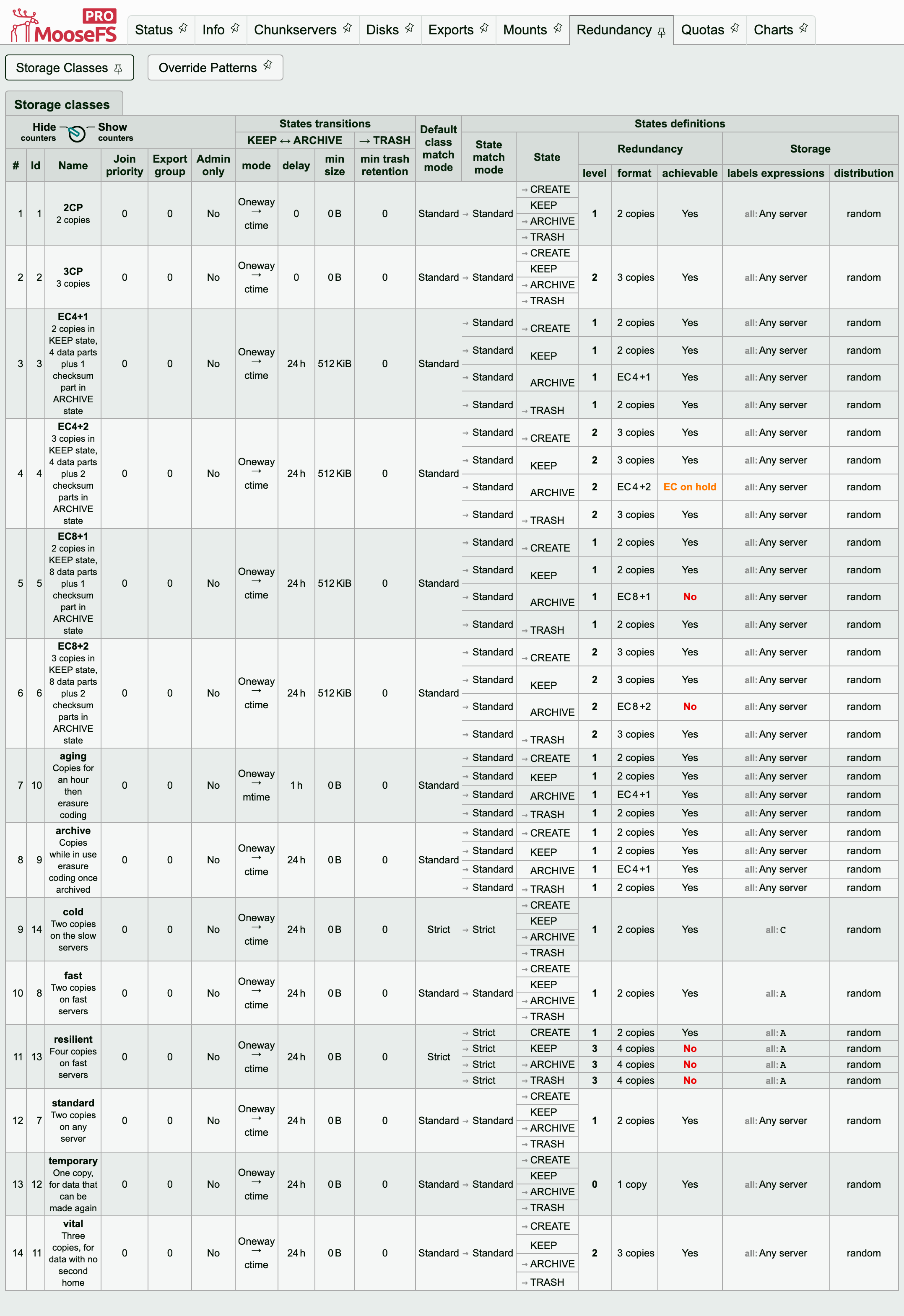
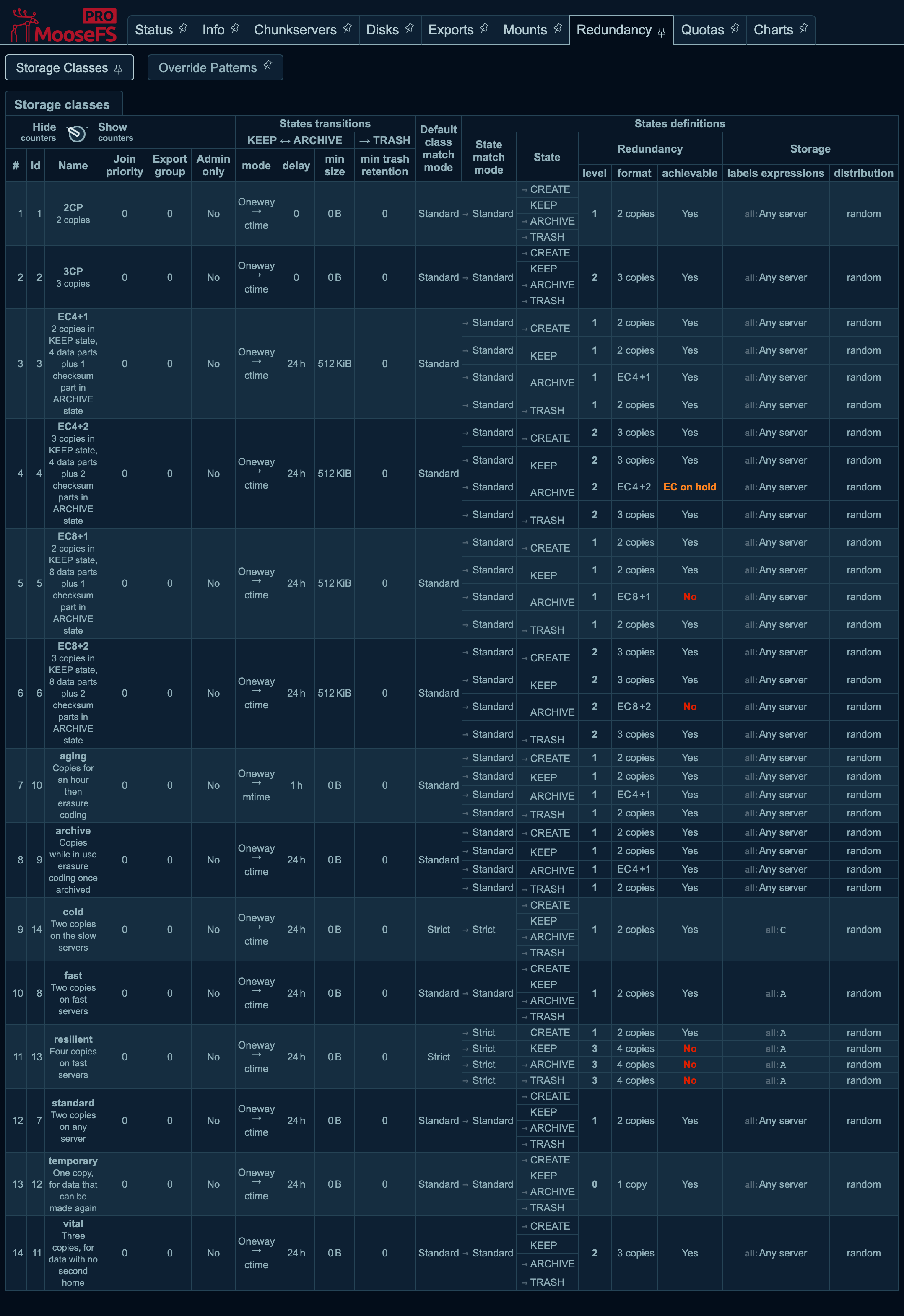
The result is in the achievable column of the Storage Classes subtab, one row per state of every class.
The messages that report these results, and every other message the cluster raises, are listed in the alerts reference.
Back to normal: the count changes between two readings taken a few minutes apart.
Maintenance mode left on holds up the repairs
Maintenance mode tells the cluster that an absence is planned and that the cluster should wait rather than rebuild. If the mode is left on after the work is done, it keeps suppressing repairs. The symptom is undergoal and endangered counts that do not change, with nothing else to explain them.
mfscli -SCS
The maintenance column names every server in the mode and says which of the two modes each server is in. The mode a Chunkserver sets for itself clears when the Chunkserver reconnects. The mode you set by hand stays on.
Clear it with the control in the Maintenance column on the Chunkservers tab of the GUI. To clear it from the command line, replace 192.0.2.21/9422 with the Chunkserver's address and port:
mfscli -H mfsmaster -CM0/192.0.2.21/9422
Back to normal: the maintenance column reads off for every server, and the counts that did not change start falling.
Overgoal and pending deletion are the cluster tidying
Neither of these grades is a fault or requires anything from you. The chunk loop removes the chunks they count on its own. The chunk loop does that work after every repair rather than before, so a cluster that has been repairing shows both. This is by design, not a backlog.
They need your action in one case: when free space is short, because the space they hold is not freed until the deletions are made. The Removed line of the chunks housekeeping table in mfscli -SIL shows the rate of that work. While the backlog grows, the Master Server raises its own per-server deletion limit and writes each raise to the system log. Where that is not enough, CHUNKS_SOFT_DEL_LIMIT and CHUNKS_HARD_DEL_LIMIT in mfsmaster.cfg set where the limit starts and where it stops. mfsmaster reload applies a change.
Back to normal: both counts fall over successive readings of mfscli -SIC, and Removed in mfscli -SIL is not zero.
Call support when data cannot be accounted for
Open a case instead of making another attempt when the cluster counts chunks as missing and no disconnected Chunkserver explains the count. The next step decides whether data is written off. Do the same when the warning that the counters may not be valid has not cleared within a few minutes of a restart or an election. Also open a case when a Chunkserver does not reconnect after you have checked its network path and its process.
Collect the state before you write:
mfscli -SIN -SCS -SHD -SSC -j > cluster-state.json
Send that file together with the system log of the Master Server and of any Chunkserver involved. Support also asks how the cluster is built: how many Chunkservers it has, what labels they have, which Storage Classes are in use, and how the chunks are distributed across those classes. How to contact MooseFS Support Team covers where to write.