Cluster health parameters
A MooseFS cluster reports its own condition as a set of counters, timestamps, and status words. This page says what each reading counts and how current it is. The page also says what a value other than zero tells you. Either the cluster is already resolving the condition on its own, or the figure stays where it is until somebody acts on it.
Self-healing and chunk versions and states define what the chunk states themselves mean. Alerting says which readings should raise an alert. Cluster health problems says what to do about a bad reading.
One owner per figure, and absent is not zero
A single Master Server maintains the chunk matrix and runs both self-check loops. In the PRO Edition PRO (PRO Edition only) that server is the Leader. A Follower queried directly answers without these sections. The tools leave the matrix and the loop sections out, the same way as when no Leader answers at all. The state column of the metadata table says which server answered.
When no Leader answers at all, the tools leave these sections out rather than printing zeros. The exporter stops publishing the series that come from those sections. A dashboard that draws zero shows a Master Server that answered. A series that disappeared shows a Master Server that did not answer.
The chunk matrix summary grades the cluster's own data
The chunk matrix table is on the Info tab of the GUI and in mfscli -SIC. The table ends in a summary line that puts every chunk into one of six grades: missing, endangered, undergoal, stable, overgoal, and pending deletion. The line follows whichever view the matrix is switched to. The GUI opens on regular chunks, which leaves out the disks marked for removal. The GUI computes its health assessment separately. The GUI always uses the table that counts all chunks, with copies and Erasure Coding parts on the same axis, so the assessment covers the whole population. mfscli prints the same tables and makes no assessment of its own.
Read a value other than zero as a statement about who resolves it.
missingsays that the cluster holds no valid copy and no usable set of parts, so the cluster has nothing to repair from. The figure does not fall on its own.endangeredandundergoalare queued for repair. A count that falls between two readings is normal. A count that does not change means that the cluster cannot complete the repair, not that the repair has not started. Self-healing lists what stops the repair.overgoalandpending deletionare surplus copies and chunks that no file refers to any more. The cluster queues the surplus and removes it after the repairs, usually well before the next pass of the loop. Chunks pending deletion wait until the chunk loop reaches them. The counters of the loop say how much of that work each pass ordered.stablecounts the chunks that hold exactly what their Storage Class requires.
The first row and the first column come before Redundancy Level zero. After them, the axes of the matrix run to Redundancy Level 9. The last row and the last column cover level 9 and everything above it, so a cell there holds a group of levels rather than one.
The counters are updated as Chunkserver reports arrive. This keeps the counters current and also causes their one caveat. While Chunkservers are connecting or disconnecting, both interfaces mark the table as possibly invalid. The same condition stops both self-check loops, so their counters do not change either.
A reading taken at that point describes a set of copies that is still being handed over. Take the reading again once the handover is over.
The exporter publishes the summary as mfs_info_chunks_summary_allchunks_missing and its five companions, with parallel families for the narrower views. The cells of the matrix are not exported, because a table of that shape does not fit the metric format. A cell is a reading in the GUI and in mfscli.
The file loop lags, but the matrix is current
The file loop produces a second reading of the same data. The file loop walks the file structure, not the chunk table. The table of the file loop appears in the GUI as the Filesystem Self-check Loop, on the Info tab, and in mfscli -SIL.


The file loop reports its own pass in the Filesystem self-check block, next to the chunk table it is meant to disagree with when something is wrong.
The table has the start and end times of the pass that produced it. The table also has the totals of files and chunks that the pass checked, and the files and chunks that were below their class. In addition, the table counts the missing files separately for ordinary files, for files in the trash, and for files held open after deletion: missing files, missing trash files, and missing sustained files. The exporter publishes the same figures as mfs_info_fs_loop_files and its companions.
Two missing figures on one cluster therefore do not have to agree, and neither of them is wrong. The matrix is updated as reports arrive. The figure of the loop reports what the walk found. That figure is as old as the pass that produced it. The chunk loop and the file loop describes how long a pass takes. For the current state of a missing chunk, read the matrix.
The list that those counters come from has the same age and says so. mfscli -SMF gives the list a heading that says it was gathered by the previous file system self-check loop. The GUI shows the list as the missing files table on the Info tab. Chunk versions and states covers how current the list is and what the type on each of its rows means.
Each row of the report is one missing chunk. The row identifies the chunk by the path and the inode of the file, the position of the chunk inside the file, the chunk ID, and the type of the loss. A file with several missing chunks therefore appears several times. For this reason, the loop counts missing files and missing chunks as two figures. A missing chunk whose file has been deleted in the meantime is listed with an unknown path in place of the name.
The pass also writes messages about what it found in the structure of the file system. mfscli -SIL prints these messages with the table. The Master Server keeps at most 1 000 000 bytes of these messages and discards the rest. On a file system with many faults, the list is therefore a sample of the pass, not everything that the pass found.
Chunk loop counters describe one closed pass
The chunk loop reports its work in the chunks housekeeping operations table. mfscli -SIL prints this table separately, under the same option as the file loop. The GUI also shows the table separately, as the Chunks Housekeeping Loop on the Info tab. Check loop started and Check loop finished are the boundaries of the last pass that completed, not of the pass that is running now. The exporter publishes the two timestamps as mfs_info_chunk_loop_start_time and mfs_info_chunk_loop_end_time.
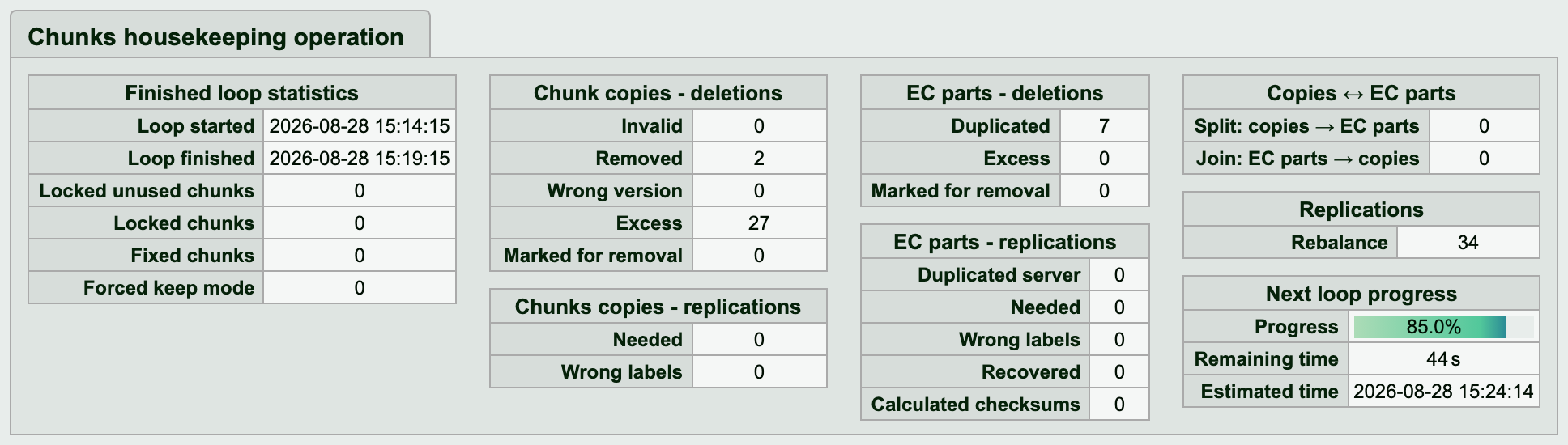
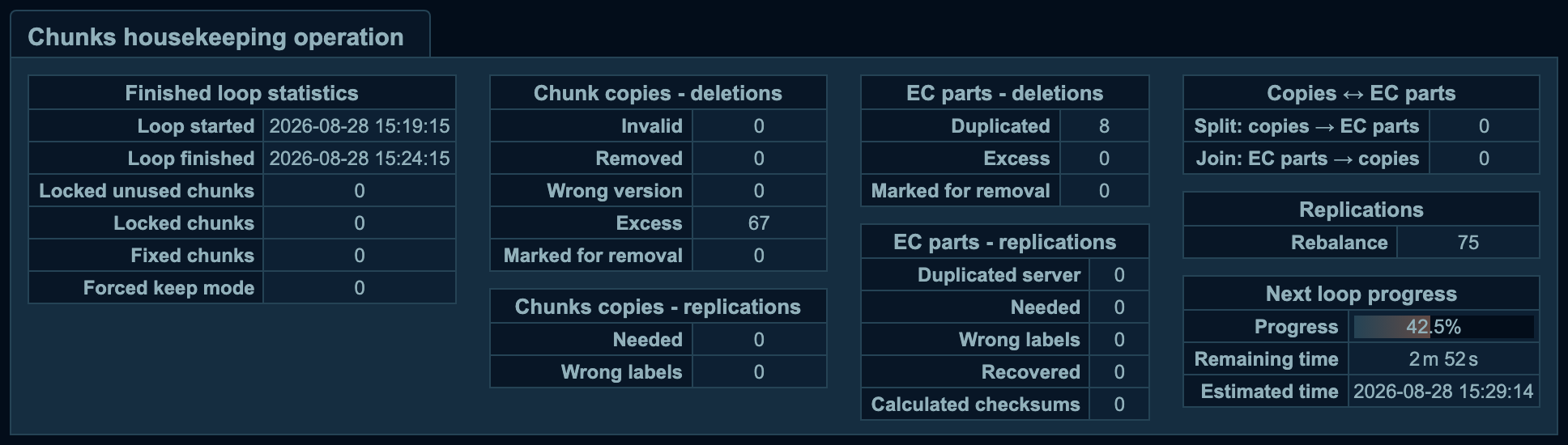
The chunk loop counts its work here: what it deleted, replicated, and rebalanced during the pass.
When a pass closes, the totals of the pass that ended replace every counter in that table. The working figures then start again from zero. Each number therefore belongs to one pass.
A figure lower than your reading from an hour ago means that another pass has closed since, not that work was undone. A sum of these numbers over time, or a rate derived from them, counts nothing.
The counters count the orders that the Master Server sent to Chunkservers, not the work that the Chunkservers confirmed. A deletion counted here was sent, not necessarily carried out.
The lines are grouped by what the pass did, so the group says where to find a figure:
Locked unused chunksandLocked chunkscount the chunks that the pass did not touch, not any work that it ordered.Fixed chunksandForced keep modecount the chunks that a pass repaired and the chunks that it kept in theKEEPstate contrary to the definition of their class.Chunk copies - deletionsandEC parts - deletionscount the deletions ordered. Together they name the reasons: invalid, wrong version, in excess of the class, stored on a disk marked for removal, a duplicate of a part that the chunk already has, andRemoved.Chunk copies - replicationsandEC parts - replicationscount the transfers ordered. The transfers cover copies and parts that were needed, copies stored where the labels of the class exclude them, and two parts of one chunk on one server. The transfers also cover parts recomputed from the rest and parity parts calculated.Copies <-> EC partscounts conversions in both directions.Replicationscounts the moves that even out how full the servers are.
Each line has one figure, not a pair. No interface reports how many operations the Master Server would have ordered if its per-server deletion cap had allowed more.
The Master Server writes a message to the system log when the cap is raised and when the cap reaches its hard limit. You can read the wanted side of a deletion figure there. The cap itself and the queues that it applies to are described in replication priorities.
The line named Removed, in the Chunk copies - deletions block, counts deletions of chunks that no file refers to any more. The exporter publishes that line as mfs_info_chunk_loop_del_no_longer_needed. That figure says how fast a cluster is freeing the space of deleted files.
The chunks that are still waiting for that work are in the pending deletion grade of the chunk matrix. The whole process from unlink to reclaimed space is described in deletion. A chunk that no file refers to but that is still held under a lock is counted separately, as Locked unused chunks. The chunk loop does not touch that chunk until the lock expires.
Progress and Estimated time left describe the pass that is running now. Progress is always a percentage. When the Master Server cannot calculate how much time is left, Estimated time left shows n/a. After a Master Server restart, the whole table shows no data until the first pass completes. The exporter publishes these two fields as text, not as numbers, so a query cannot compare them. Build queries on the end time of the last pass instead.
The two timestamps are also the only measurement of how long a pass takes on a given cluster. The size of the chunk registry and the settings that pace the loop limit that duration, but no rule converts them into a number of minutes.
A Chunkserver reads connected, disconnected, or maintenance
The Chunkservers tab of the GUI and mfscli -SCS list every server that the Master Server has registered, with the disconnected servers in a separate block. The exporter reports the same distinction as mfs_chunkservers_connected, which is 1 for a connected server and 0 for a server that is not connected.
In mfscli -SCS, the maintenance column shows off, on (permanent), or on (<n> seconds left) for the mode set by hand. The column shows on (temp ; <n> seconds left) for the temporary mode. A Chunkserver announces this temporary mode for itself when its process is stopped in a controlled way. A shown timeout is the time left on the clock that clears the mode. The mode set by hand runs that clock only when CS_MAINTENANCE_MODE_TIMEOUT sets a timeout. The GUI shows the same column as OFF, ON, or TMP. The exporter publishes the reading as the maintenance_mode label of mfs_chunkservers_misc, with the values off, on, and on (temp), or not available when no Leader is found.
Read the two columns together. A disconnected Chunkserver under maintenance is an absence that the cluster was told to expect. As long as every disconnected server is in that state, the cluster suspends repairs around those servers. undergoal and endangered counts that do not change are therefore explained by maintenance, not by a shortage of space or of servers. Maintenance mode covers what the state suspends and how it ends.
A server that stays disconnected past CS_DAYS_TO_REMOVE_UNUSED in mfsmaster.cfg is removed from the cluster's records, together with its maintenance state. A row that has disappeared from the list is therefore a separate reading, next to connected and disconnected.
A disk reports space, last error, and status
The Disks tab and mfscli -SHD report, per disk, the space used and the total with the percentage, the number of chunks, and the time of the last error recorded there. Both also report a status. The GUI adds the chunk ID of that error in the tooltip of the cell. The exporter publishes these values as mfs_disks_used, mfs_disks_total, mfs_disks_used_percent, mfs_disks_chunks, mfs_disks_last_error_time, mfs_disks_last_error_chunkid, and mfs_disks_scan_progress.
The status is ok for a disk in service and ok (errors) for a disk that is in service and has errors on its record. The status is scanning while the Chunkserver is reading the contents of the disk. The remaining readings are damaged, invalid, and, for a disk marked for removal, one of the removal results. Disk error handling and disk removal covers what puts a disk into each of these states, and what the removal results mean.
A disk on a server that the tools cannot reach shows as unknown. So does a disk on a server that is too old to report its state. In both cases, the status names the reason. That reading is about the Chunkserver, not about the disk.
A Chunkserver is full before its disks are
Space per disk, per server, and for the cluster as a whole is read in the places that space management lists. Raw space and user space covers what is already deducted inside those figures.
The threshold that matters for health is the Master Server's, not the file system's. Once a Chunkserver reports free space of 1 percent of its capacity or less, the Chunkserver counts as having no space and stops being a target for replication. New chunks stop at a different point. A Chunkserver accepts new chunks only as long as it reports more free space than one chunk. That threshold is raised by ten chunks for every chunk copy that clients hold open for writing on that Chunkserver.
Chunks that would have been repaired onto that server therefore stay below their class for as long as the condition lasts. This is one of the causes of an undergoal count that does not fall. At that point, the disks of the server still show free space. Both readings are correct: the space is there, and the Master Server does not put anything in it.
Metadata figures are read against another Master Server's
The Metadata Servers table, on the Info tab and in mfscli -SIM, has one row per Master Server. Each row shows the address, the version, and the state of the server. The row also shows the metadata version and the metadata ID that the server holds, the delay of its metadata PRO (PRO Edition only), and the record of its last save. That record has the time, the duration in seconds, the status, the metadata version saved, and the checksum. The checksum of the server's exports is next to it.
A Metalogger keeps a copy of the same metadata, but it writes no metadata dump of its own. The Metalogger downloads the dump that the Master Server made. The Metalogger therefore has no last-save record. Instead of a row in the first table, the Metalogger gets a short second table underneath. That table shows the address, the version, and the host name of the Metalogger. The title of the block is Metadata servers (masters) and Metaloggers when there is a Metalogger to list.


One row per Master Server: the state it is in, the metadata it holds and how its last save went. The Metalogger, which holds the same metadata but writes no dump of its own, is in the short table underneath.
The four metadata numbers are defined in metadata ID, version, delay, and checksum. That page also explains which divergence is serious and which is ordinary. Metadata save states covers what the save status says about the way the file was written. Leader election and quorum covers what the values of the state column mean.
One of these readings is comparable only under a condition. A saved checksum is comparable with the saved checksum of another Master Server only when both servers saved the same metadata version. That is also the only case that the cluster treats as a divergence. When the saved versions differ, the two checksums are not comparable.
In the exporter, every mfs_info_masters_* series has a state label, so a query names the role that it targets, not an address. LEADER is an exact match, because the suffix that says how far a copy is behind the Leader is never attached to the state of the Leader.
The columns whose values are words, not numbers, include the state and the checksums. The exporter publishes these columns as labels of mfs_info_masters_misc, not as separate series. The save status is published both ways: as the number mfs_info_masters_last_metadata_save_status, and as text in the last_metadata_save_status_txt label.
One set of figures, three ways to read it
These readings are one set of numbers, held by the Master Server and presented three ways. The GUI shows them on the Info tab, and the CLI prints them section by section. The Prometheus exporter publishes them under the names collected in the metrics reference.
The three interfaces do not name their sections alike. The exporter also publishes less than the GUI and the CLI. mfscli -SIL prints both self-check loops, each as a table with its own title. The GUI shows the two loops separately as the Filesystem Self-check Loop and the Chunks Housekeeping Loop. The GUI and the CLI show the cells of the chunk matrix and the progress of either loop as a number to compare. The exporter shows neither.